Notice: Function _load_textdomain_just_in_time was called incorrectly. Translation loading for the acf domain was triggered too early. This is usually an indicator for some code in the plugin or theme running too early. Translations should be loaded at the init action or later. Please see Debugging in WordPress for more information. (This message was added in version 6.7.0.) in /home/u289084059/domains/jabbla.bytebite.be/public_html/wp-includes/functions.php on line 6260

Notice: Function _load_textdomain_just_in_time was called incorrectly. Translation loading for the simple-lightbox domain was triggered too early. This is usually an indicator for some code in the plugin or theme running too early. Translations should be loaded at the init action or later. Please see Debugging in WordPress for more information. (This message was added in version 6.7.0.) in /home/u289084059/domains/jabbla.bytebite.be/public_html/wp-includes/functions.php on line 6260

Notice: Function _load_textdomain_just_in_time was called incorrectly. Translation loading for the invisible-recaptcha domain was triggered too early. This is usually an indicator for some code in the plugin or theme running too early. Translations should be loaded at the init action or later. Please see Debugging in WordPress for more information. (This message was added in version 6.7.0.) in /home/u289084059/domains/jabbla.bytebite.be/public_html/wp-includes/functions.php on line 6260

Notice: Function _load_textdomain_just_in_time was called incorrectly. Translation loading for the wordpress-seo domain was triggered too early. This is usually an indicator for some code in the plugin or theme running too early. Translations should be loaded at the init action or later. Please see Debugging in WordPress for more information. (This message was added in version 6.7.0.) in /home/u289084059/domains/jabbla.bytebite.be/public_html/wp-includes/functions.php on line 6260
Facebook Messenger en Whatsapp in SCORE v2 - Jabbla

Facebook Messenger en Whatsapp in SCORE v2

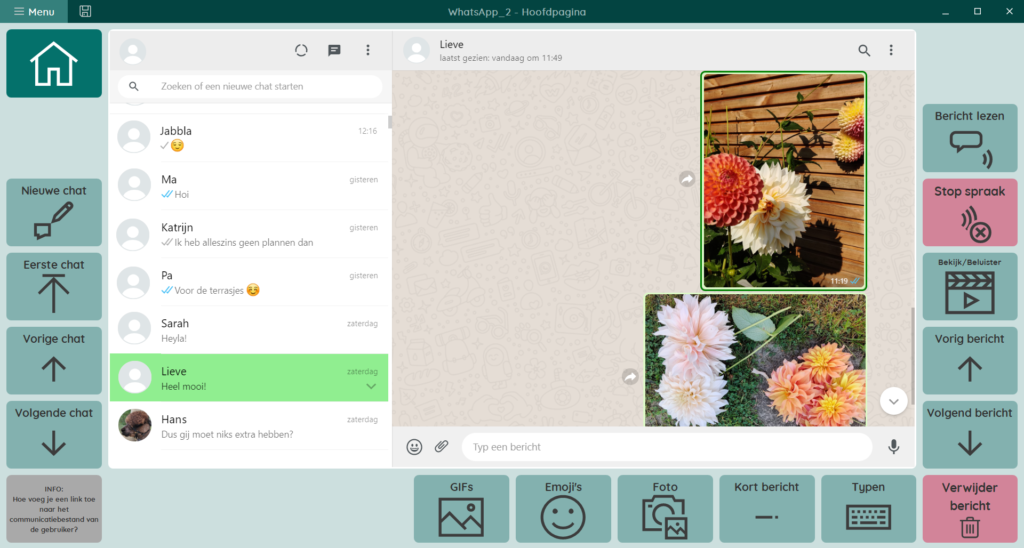
Wil je Messenger en/of Whatsapp integreren in jouw SCORE v2? Je kan het stappenplan als Mind Express 5 bestand importeren of de onderstaande stappen volgen.

1. Download de nieuwe SCORE-pagina’s voor Whatsapp en/of Messenger.
Bewaar de pagina’s op een locatie naar keuze op je toestel of computer.

2. Importeer de pagina’s in je eigen SCORE v2 door:

  • Ga naar je eigen SCORE v2.
  • In jouw SCORE v2 ga je naar “Menu” > “Bewerken”.
  • Ga in het bewerkvenster rechts naar het tabblad “Pagina” en klik op het icoon van “Pagina-instellingen”.
  • Klik op het icoon van “Pagina’s importeren”.
  • Ga naar de locatie op je toestel of computer waar je de pagina’s bewaard hebt. Klik het bestand aan en selecteer “Openen”.
  • De pagina’s zijn nu toegevoegd aan je eigen SCORE.

3. Maak vakjes in je SCORE om de Whatsapp- en Messenger-pagina’s te kunnen bereiken:

  • Beslis waar je de vakjes wil toevoegen en geef ze een passende figuur en label.
  • Voeg in één vakje de Actie “Ga naar: Ga naar pagina” toe. Kies de pagina “MEDIA > Whatsapp”.
  • Herhaal dit in het andere vakje voor “MEDIA > Messenger”.
  • Sla alles op.
  • De eerste keer zal je Whatsapp moeten koppelen en moeten inloggen in Messenger. Volg hiervoor telkens de stappen in het grote venster op de betreffende pagina.

Notice: ob_end_flush(): failed to send buffer of zlib output compression (1) in /home/u289084059/domains/jabbla.bytebite.be/public_html/wp-includes/functions.php on line 5581

Notice: ob_end_flush(): failed to send buffer of zlib output compression (1) in /home/u289084059/domains/jabbla.bytebite.be/public_html/wp-includes/functions.php on line 5581