Notice: Function _load_textdomain_just_in_time was called incorrectly. Translation loading for the acf domain was triggered too early. This is usually an indicator for some code in the plugin or theme running too early. Translations should be loaded at the init action or later. Please see Debugging in WordPress for more information. (This message was added in version 6.7.0.) in /home/u289084059/domains/jabbla.bytebite.be/public_html/wp-includes/functions.php on line 6260

Notice: Function _load_textdomain_just_in_time was called incorrectly. Translation loading for the simple-lightbox domain was triggered too early. This is usually an indicator for some code in the plugin or theme running too early. Translations should be loaded at the init action or later. Please see Debugging in WordPress for more information. (This message was added in version 6.7.0.) in /home/u289084059/domains/jabbla.bytebite.be/public_html/wp-includes/functions.php on line 6260

Notice: Function _load_textdomain_just_in_time was called incorrectly. Translation loading for the invisible-recaptcha domain was triggered too early. This is usually an indicator for some code in the plugin or theme running too early. Translations should be loaded at the init action or later. Please see Debugging in WordPress for more information. (This message was added in version 6.7.0.) in /home/u289084059/domains/jabbla.bytebite.be/public_html/wp-includes/functions.php on line 6260

Notice: Function _load_textdomain_just_in_time was called incorrectly. Translation loading for the wordpress-seo domain was triggered too early. This is usually an indicator for some code in the plugin or theme running too early. Translations should be loaded at the init action or later. Please see Debugging in WordPress for more information. (This message was added in version 6.7.0.) in /home/u289084059/domains/jabbla.bytebite.be/public_html/wp-includes/functions.php on line 6260
CloudStorage.exe error - Jabbla

Notice: Undefined variable: faqcat_selected in /home/u289084059/domains/jabbla.bytebite.be/public_html/wp-content/themes/jabbla/single-faq.php on line 31

Notice: Undefined variable: faqcat_selected in /home/u289084059/domains/jabbla.bytebite.be/public_html/wp-content/themes/jabbla/single-faq.php on line 31

Notice: Undefined variable: faqcat_selected in /home/u289084059/domains/jabbla.bytebite.be/public_html/wp-content/themes/jabbla/single-faq.php on line 31

Notice: Undefined variable: faqcat_selected in /home/u289084059/domains/jabbla.bytebite.be/public_html/wp-content/themes/jabbla/single-faq.php on line 31

Notice: Undefined variable: faqcat_selected in /home/u289084059/domains/jabbla.bytebite.be/public_html/wp-content/themes/jabbla/single-faq.php on line 31

Notice: Undefined variable: faqcat_selected in /home/u289084059/domains/jabbla.bytebite.be/public_html/wp-content/themes/jabbla/single-faq.php on line 31

Notice: Undefined variable: faqcat_selected in /home/u289084059/domains/jabbla.bytebite.be/public_html/wp-content/themes/jabbla/single-faq.php on line 31

Notice: Undefined variable: faqcat_selected in /home/u289084059/domains/jabbla.bytebite.be/public_html/wp-content/themes/jabbla/single-faq.php on line 31

Notice: Undefined variable: faqcat_selected in /home/u289084059/domains/jabbla.bytebite.be/public_html/wp-content/themes/jabbla/single-faq.php on line 31

Notice: Undefined variable: faqcat_selected in /home/u289084059/domains/jabbla.bytebite.be/public_html/wp-content/themes/jabbla/single-faq.php on line 31

Notice: Undefined variable: faqcat_selected in /home/u289084059/domains/jabbla.bytebite.be/public_html/wp-content/themes/jabbla/single-faq.php on line 31

Notice: Undefined variable: faqcat_selected in /home/u289084059/domains/jabbla.bytebite.be/public_html/wp-content/themes/jabbla/single-faq.php on line 31

Notice: Undefined variable: faqcat_selected in /home/u289084059/domains/jabbla.bytebite.be/public_html/wp-content/themes/jabbla/single-faq.php on line 31

Notice: Undefined variable: faqcat_selected in /home/u289084059/domains/jabbla.bytebite.be/public_html/wp-content/themes/jabbla/single-faq.php on line 31

Notice: Undefined variable: faqcat_selected in /home/u289084059/domains/jabbla.bytebite.be/public_html/wp-content/themes/jabbla/single-faq.php on line 31

Notice: Undefined variable: faqcat_selected in /home/u289084059/domains/jabbla.bytebite.be/public_html/wp-content/themes/jabbla/single-faq.php on line 31

Notice: Undefined variable: faqcat_selected in /home/u289084059/domains/jabbla.bytebite.be/public_html/wp-content/themes/jabbla/single-faq.php on line 31

Notice: Undefined variable: faqcat_selected in /home/u289084059/domains/jabbla.bytebite.be/public_html/wp-content/themes/jabbla/single-faq.php on line 31

Notice: Undefined variable: faqcat_selected in /home/u289084059/domains/jabbla.bytebite.be/public_html/wp-content/themes/jabbla/single-faq.php on line 31

Notice: Undefined variable: faqcat_selected in /home/u289084059/domains/jabbla.bytebite.be/public_html/wp-content/themes/jabbla/single-faq.php on line 31

Algemeen

Spraakcomputers

Woordenschatten

Software

CloudStorage.exe error

Vanaf versie 5.5.0.1153 krijg je bij het opstarten van Mind Express een melding in het profiel-overzicht indien de CloudStorage.exe niet correct is opgestart.

Deze zal er als volgt uitzien:

Deze melding kan verschillende oorzaken hebben. Hieronder lijsten we deze op zodat je gericht kan nakijken waar het is misgelopen.


Een antivirus heeft de CloudStorage.exe verwijderd.

Kijk na in de installatie folder van ME5 of de exe nog bestaat. Je vindt deze normaal terug onder: “C:\Program Files (x86)\Mind Express 5\Cloud\CloudStorage.exe”. Als de CloudStorage.exe hier niet meer staat, kijk je best in je antivirusprogramma (het kan in quarantaine staan).


CloudStorage.exe is vastgelopen tijdens een vorige sessie van Mind Express.

Kijk in taakbeheer of CloudStorage.exe nog actief is.
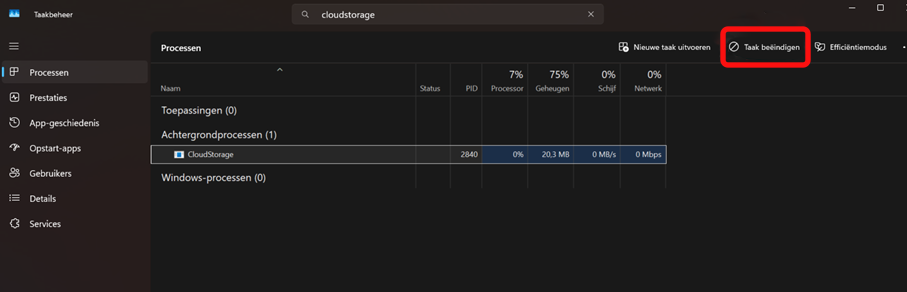
Indien het nog actief is, klik op “Taak beëindigen”.


Mind Express heeft de rechten niet om CloudStorage.exe op te starten

Het is mogelijk om in de instellingen van een Antivirusprogramma of instellingen van Windows defender, de rechten af te nemen voor een applicatie om andere applicaties op te starten. Als deze zijn ingeschakeld, kan CloudStorage.exe niet opstarten.

Kijk dus even na of dit het geval is in jouw antivirusprogramma of in Windows defender.


Het netwerk heeft de CloudStorage.exe poort geblokkeerd.

De CloudStorage.exe gebruikt de lokale poort “http://localhost:60000″. Als deze geblokkeerd is door het netwerk, zal CloudStorage.exe ook niet correct werken.


De Profielen map (users folder) is niet geldig.

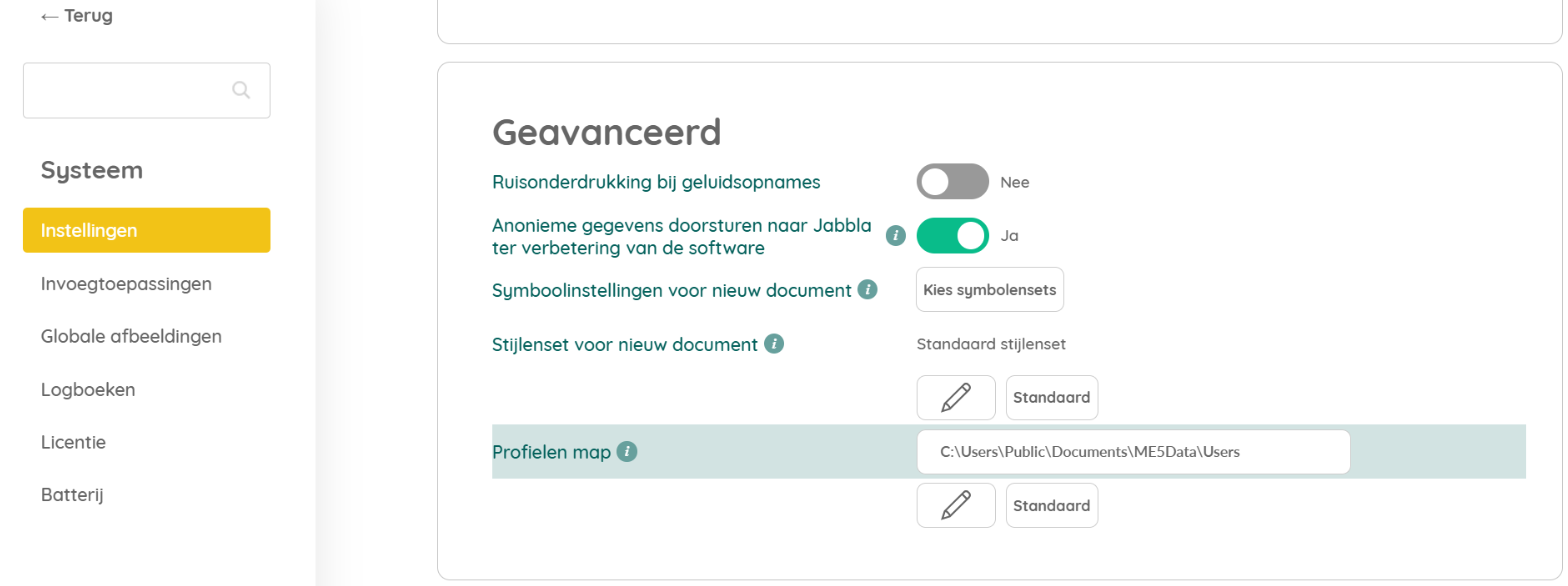
Als in de systeeminstellingen van Mind Express de locatie niet correct is van de profielen map kan dit problemen geven met de CloudStorage.
Je kan dit nagaan via Menu > Systeem > Instellingen > Geavanceerd. De standaard locatie is “C:\Users\Public\Documents\ME5Data\Users”.

Notice: ob_end_flush(): failed to send buffer of zlib output compression (1) in /home/u289084059/domains/jabbla.bytebite.be/public_html/wp-includes/functions.php on line 5581

Notice: ob_end_flush(): failed to send buffer of zlib output compression (1) in /home/u289084059/domains/jabbla.bytebite.be/public_html/wp-includes/functions.php on line 5581